
Choosing a hotel booking system can feel like a maze. You hear terms like Property Management System (PMS), front-desk system, booking engine, and channel manager used as if they are all the same thing. They aren’t, and that is where the confusion starts.
At NightsBridge, we offer a complete platform — from front-desk management and invoicing to online sales and channel distribution. For properties that already use another system, we connect easily to handle the online side. Either way, the goal is the same: fewer headaches, more bookings.
Let’s clear up the jargon and help you find a setup that fits your property.
What is a Property Management System (PMS)?
A Property Management System (PMS) — sometimes called a front-desk system or booking management system — is the software you use to manage the operational side of your property.
Think of it as the digital replacement for a room chart on the wall and a hand-written cash book, with a great deal more capability. A good PMS lets you track who is in which room, manage check-ins and check-outs, assign housekeeping tasks, raise invoices, store guest details, and keep on top of your accounts — including connections to your accounting software.
NightsBridge includes a full-featured PMS that handles all of this for most accommodation types — from a small bed and breakfast to a busy guest house or boutique hotel. If you run a larger operation with complex last-minute room allocations to maximise occupancy, multi-department staff management, or advanced reporting requirements, a specialist enterprise platform may suit you better. In that case, NightsBridge connects directly to those systems, adding our powerful online booking and channel management capabilities on top.
The name NightsBridge reflects what sits at the heart of our product: the bridge between your property and the online world.
What is a booking engine?
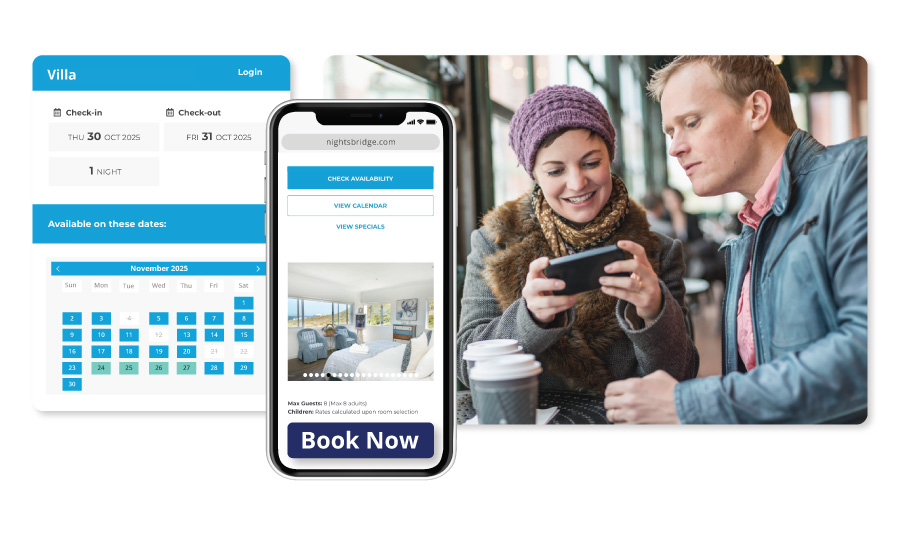
A booking engine is the web-page guests see when they want to book online. It is the “Book now” button on your website that opens a clean real-time booking form. Guests pick their dates, see which rooms are available, choose their rate, and confirm their stay.
This turns your website — and your social media pages — into a 24/7 booking channel. Guests can book at any time without waiting for an email reply or a phone call. Because the booking happens directly on your site, you pay no commission to an online travel agent.
With NightsBridge, the booking engine is branded to your property but runs on our technology. It pulls live availability and rates from your NightsBridge PMS or your own connected PMS. Once a guest confirms, the booking shows up inside your PMS straight away — no double capturing required.
What is a channel manager?
A channel manager links your property to third-party booking sites like Booking.com, Airbnb, LekkeSlaap, and other online travel agents or corporate booking platforms.
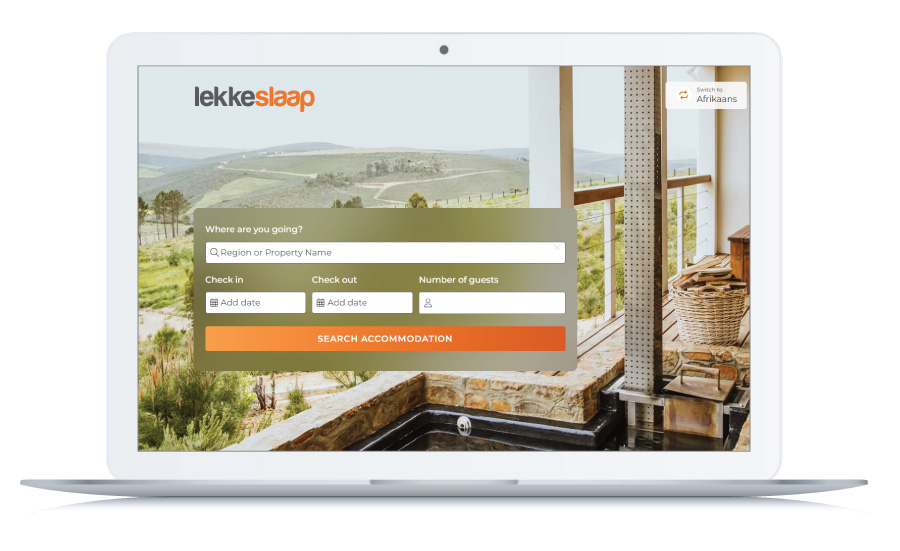 Without a channel manager, you have to log into each of those sites separately to manually update your prices and availability every time you get a walk-in or a cancellation. With NightsBridge, you make the change once in your central calendar and we push those updates to every connected channel automatically. Bookings from those channels flow back into your calendar in real time, eliminating double bookings and costly date mistakes.
The NightsBridge Channel Manager integration connects you to an extensive network of both local and international channels, offering one of the broadest distributions available to South African accommodation providers.
 Related Read: Channel management for accommodation: The complete guide
Which setup is the right fit for your property?
Once the terminology makes sense, the next step is matching the software to how you actually run your business day to day. There are two common ways to structure your technology.
NightsBridge as your complete system.
Most properties use NightsBridge as their single management platform. You run your front desk, manage reservations, raise invoices, and connect to your accounting software all from one place. Your booking engine and channel manager are built right in, so online sales flow directly into the same system without any extra admin.
NightsBridge alongside your existing PMS.
If you already use a dedicated enterprise PMS, or if your operation requires specialised capabilities beyond what any single platform provides, we integrate directly. Your existing system continues to manage on-site operations, while NightsBridge handles your online shop window: syncing rates across all channels, processing direct bookings, and managing online payments. The two systems share a single source of truth, so nothing falls between the cracks.
Why your choice of system matters.
Your PMS affects how your team works every day. Your booking engine affects how guests experience your brand. A strong booking engine shows real-time availability, clear pricing, and payment options that feel familiar and safe. A channel manager should connect you to the specific local and international channels that actually generate bookings for your specific region.
On your side of the desk, you should be able to change a rate, create a special offer, or close a date without worrying that you’ll break something. Because NightsBridge works with thousands of properties across South Africa, our tools are built for the actual work required in a hands-on accommodation business.
Bed and breakfast booking systems: built for multi-tasking owners.
B&B owners often do everything themselves. You answer the phone, welcome guests, cook breakfast, and send invoices. Your booking setup should give you breathing room, not another long to-do list.
With NightsBridge, your website gets a commission-free booking engine that turns casual browsers into paying guests. You set your rates once and we push those updates to your online partners. You can check arrivals or close a room from your phone using the NightsBridge App while you’re busy in the kitchen or out running errands.
To see a real bed and breakfast booking system in action, read Hopefield BnB’s post‑pandemic comeback. Owner Nicky juggles Hopefield BnB, a self‑catering property, a farm, family and a small deli, and still stays on top of bookings from her phone: “Every day I am able to check any bookings. It lets me quickly see bookings for both establishments at a glance.”
Related Read: See how the right NightsBridge partners turn bookings into business for your establishment.
Guest house booking systems: balancing corporate and leisure.
Guest houses often sit between a home-style B&B and a full hotel. You might host corporate travellers during the week and leisure guests at weekends, which means dealing with different rates, occasional group bookings, and invoicing companies rather than individual guests.
NightsBridge manages all of this within a single platform. While you focus on looking after guests on site, your booking engine quietly fills gaps and your channel manager keeps your listings accurate across the web.
For a real-world example, read A day at Riversong Guest House: Gary’s on-site experience. Riversong juggles different kinds of guests on the same day, but a clear routine and a solid hotel booking system keep things steady. As Gary says: “Riversong Guesthouse runs like a calm, capable home… The structure holds, even on a tough day. That is the heart of an efficient guesthouse workflow.”

A simple 5-step plan to choose your setup.
If you feel overwhelmed by all the software options on the market, simply work through these five questions:
-
Write down your must-haves. Do you need to stop double bookings, increase direct website bookings, or manage complex corporate accounts and invoicing?
-
Decide on your approach. Is NightsBridge on its own the right fit, or do you already have an enterprise property management system you want to keep?
-
Check for clean integrations. If you use another system, confirm it connects to NightsBridge so bookings and availability move across without extra admin.
-
Test the booking engine as a guest. Go to your own website and try to book a room. If you get stuck or feel unsure, your guests will too.
-
Look at support and total cost. Add up subscriptions and fees, but also ask who you can phone on a Sunday afternoon when you’re stuck and how quickly they respond.
Bringing it all together.
In plain language: your PMS manages rooms, guests, invoices, and accounts inside the property. Your booking engine and channel manager bring bookings in from your website and online partners.
NightsBridge works as a complete management platform for B&Bs, guest houses, boutique hotels, or larger sites. For properties already running a dedicated enterprise PMS, we connect as the expert online layer, linking you to a wide network of channels and delivering payment solutions built specifically for the African market.
If you’re not sure where your business fits, speak to us. Tell us how many rooms you have and how you handle bookings today, and we’ll help you work out the right setup for your business.